The CAD-yard

Post a reply

Confirmation code
Enter the code exactly as it appears. All letters are case insensitive.
Smilies
:smallsmile: :wave_1: :big_grin: :thumbs_up_1: :heh: :cool_1: :cool_2: :woo_hoo:
View more smilies

BBCode is ON
[img] is ON
[url] is ON
Smilies are ON

Topic review
   

Expand view Topic review: The CAD-yard

Re: The CAD-yard

by tea monster » Wed Oct 23, 2013 5:15 pm

Thanks, good to hear from you again!

Iv'e actually been working on both the Tecumseh (redone the raft and adjusted all the shaders for Cycles. I've also got a scene together with the Tennessee. I'm quite proud of that one and I'll post a version up when it's been adjusted a bit.

Owen

Re: The CAD-yard

by Roscoe » Tue Oct 22, 2013 10:49 am

tea monster wrote:Just proving that I haven't fallen off the edge of the earth.

Owen
I have! :big_grin: Just kidding, but it sure seems like it.

The Teaser looks great, and your re-purposed Teaser/Paddlewheel steamer looks really good too, nice one!

Take care,
Dean

Re: The CAD-yard

by tea monster » Sun Oct 20, 2013 3:01 pm

I needed a paddlewheel steamer in the background of a shot so I re-purposed the Teaser. It only took me a few hours.

Image

If only the Confederacy knew how quicky you could turn these things around. :D

Re: The CAD-yard

by tea monster » Fri Mar 15, 2013 3:50 pm

Just proving that I haven't fallen off the edge of the earth.

Owen
teaserteaser.jpg

Re: The CAD-yard

by shiphandler251 » Mon Jan 28, 2013 11:21 am

Hi Dean,
Thanks for that. It is very helpful. I have already downloaded the free to use version of Sketchup. I've had a some practice on it, and had some success and more frustration. It seemed very insistent on right angles and didn't seem very happy with curves. Either (in order of likelihood) I didn't know what I was doing or I need to get to the full program.
I've been looking at CAD stuff and the variety of offerings in bewildering. So I am very glad to have you recommend Sketchup, as it means I can apply myself to learning the ropes knowing that I'm not struggling with something that will end up being the wrong program.
Thanks again for your very interesting posts. I'm going to have some more cracks at Sketchup and will likely come back for some help.
Cheers John

Re: The CAD-yard

by Roscoe » Sun Jan 27, 2013 8:59 pm

Hey John,

Welcome to the forum, and I'm glad you enjoyed the CAD-Yard thread.

Shetchup is free, and fairly easy to get into, you can give it a try to see if it interest's you. There's also a ton of free downloadable models from their 3DWarehouse you can check out, and quite a few forums too.
http://www.sketchup.com/
http://sketchup.google.com/3dwarehouse/

One thing to remember when making small scale models for 3D printing, your limited to the amount of detail you can achieve from the printer and material, so you'll have to keep them fairly simple at those scales.

-Dean

Re: The CAD-yard

by shiphandler251 » Sun Jan 27, 2013 2:43 pm

Hello All,
I've been on this site for a week or two, and it's taken me until tonight to get through all the CAD Yard discussion. Reading it has been very helpful and informative, for which I thank all those who have contributed.
I'm returning to ship modelling/wargaming after a longish pause. I'm currently doing up a 1/2400 scale WW2 collection using GHQ and CinC models. I am also interested in sailing warships from 1793-1815.
I have also been aware of the approach of 3D printing and its implications for ship modelling.
I would like to learn CAD work to enable me to do models at 1/1200 and smaller scales.
I'm struggling to get my head around all the sorts of CAD available. My want to do is to create acceptable models suitable for 3D printing in 1/1200 and smaller scales. My first priority is to identify a CAD program that will be best for me. In the past, as a model builder I have acquired a substantial library of scale plans, and would hope to be able to use these as a starting point.
I hope some of you could make some suggestions.
Thank you
John L

Re: The CAD-yard

by Roscoe » Sun Dec 30, 2012 10:33 am

Thanks Guys.

Ha-ha, yeah, "Ba-Hoom", I have to admit, done that a few times already. Did some test perspective shots from the unfinished first scene a little while back, just to get an idea of how it would look.

One shot, no pun intended, from the deck of the Perry.

Image

And one atop the Chickasaw turret.

Image

-Dean

Re: The CAD-yard

by tea monster » Sat Dec 29, 2012 7:18 pm

Dude! That's amazing. Just imagine having a room with those models in so you can sight over the top of the lead turret in chickasaw towards the rebel fleet and make "ba-hoom" noises.

Owen

Re: The CAD-yard

by Devin » Fri Dec 28, 2012 9:10 pm

A quick look on my online bible (Ironclads and Blockade Runners) shows Onondaga at 226' and the Milwaukee class at 229', so you're darn close!

Re: The CAD-yard

by Roscoe » Fri Dec 28, 2012 9:04 pm

Well actually, I just eyeballed the size when I scaled down the models after I brought them into the scene, so it may not be an accurate comparison. :big_grin:

Thanks,
Dean

Re: The CAD-yard

by Devin » Fri Dec 28, 2012 8:51 pm

Now THAT's cool!

I guess I hadn't looked at the LOA's close enough to realize that Chickasaw and Onondaga were so close in size.

Re: The CAD-yard

by Roscoe » Fri Dec 28, 2012 8:43 pm

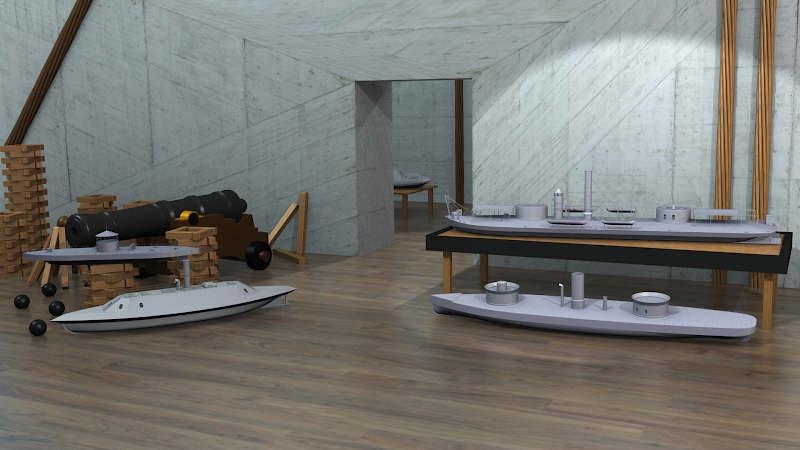
Continuing on with the display idea, I downloaded a nice Blender scene file by "JoJoJoy" from http://www.blendswap.com/, which I'll start modifying to make the display room. The nice thing about that site is there are hundreds of free open source files to download and use as you like, and all you have to do is register, which is free of course. A big time saver, if like me, you have more projects than time, or just want to get a feel for Blender and see how more experienced Blender heads do things.
So after tweaking the lighting, adding a few models, and hitting the render button, this is what I have so far, which will change as I add more of my own touches to the scene.
Image

Take care,
Dean

Re: The CAD-yard

by Roscoe » Tue Nov 27, 2012 6:51 pm

Thanks for the link, I haven't seen that one yet, but I have watched a couple others, and it looks pretty cool. I guess I'll just have to try it out and see what happens. :smallsmile:

-Dean

Re: The CAD-yard

by tea monster » Tue Nov 27, 2012 2:01 pm

There is a dynamic paint tut here. I've not worked with it myself though.

http://www.miikahweb.com/en/articles/dy ... aint-guide

Owen

Re: The CAD-yard

by Roscoe » Mon Nov 26, 2012 6:47 pm

Lol, you guys are just too much... Although, that door or hatch to a bigger display table idea does sound really cool, hmm. :big_grin:

Owen,
I wonder if I could use that dynamic paint feature in Blender to simulate some putty patches on the models? Have any experience with that?

Phil,
That Escher like idea would definitely make a great scene, or even better, a short movie clip. When I get the regular size display room done, I just might have to give that a try....:thumbs_up_1:

-Dean

Re: The CAD-yard

by tea monster » Mon Nov 26, 2012 3:34 pm

Yes, you would make it so that the door in the work shop matched one of the hatches on the ironclad.

But one day, you would notice an exact copy of that door in your garage. While you were pondering on how long it had been there, the hatch clicks and slowly starts to open...

Owen

Re: The CAD-yard

by DrPR » Mon Nov 26, 2012 2:08 pm

Dean,

You could develop this into a real mind bender. Draw the entire workshop, with a door to the outside world. When you go through that door step out onto the deck of one of the virtual models. Then you could look at the surrounding fleet with a 1:1 perspective, but they would still be sitting on a very large table, in the very large workshop. Go back in the door and you would see the fleet as you would looking at a table full of models.

You could create something Escher would have been proud of.

Phil

PS: We can think up all sorts of ways to waste your time.

Re: The CAD-yard

by tea monster » Mon Nov 26, 2012 4:04 am

What you need to do is to get some repeating textures of primer with some modelling putty poking through here and there where it's been sanded down.

Next, you need a copy of either 'Make Human' or 'Poser' to make yourself a digital alter ego.

Put them all together and enter one of the 'real' modelling threads. You could decide to have your digital creation's personality hate virtual modelling and set out to prove that any model he can make in 'real life' can be just as perfect as a CAD model. You could even have it that you get into a modelling competition with your creation.

This could be very entertaining for a certain amount of time, but if you wound up in therapy at the end of it all, don't blame me.

If you were feeling really subversive and cheeky, you could model him to have a faint resemblance to one of these guys...

Owen

Re: The CAD-yard

by Roscoe » Sun Nov 25, 2012 5:56 pm

Fritz,

That's a great idea :thumbs_up_1:, a few Xacto knives, bottle of glue, a building mat, and some material scattered around a workbench sounds cool. Thanks for the idea.

Yeah, importing those models as IGES or DXF files might work better, I haven't tried it yet, but I have a feeling they would still need some re-surfacing work. I basically just imported them as STL files, which works well enough to get the overall shape of the model for scene rendering/placement practice. Although I'll still probably use a couple of those models to put on a workbench as WIP's, along with some tools, until my Blender fleet gets built up. :smallsmile:

-Dean

Top