I HATE drawing 3D instruction sheets! (Completed)
Moderator: ArizonaBB39
-
Rusty White
- Flagship Models

- Posts: 280
- Joined: Fri Jan 14, 2005 11:02 pm
- Contact:
I HATE drawing 3D instruction sheets! (Completed)
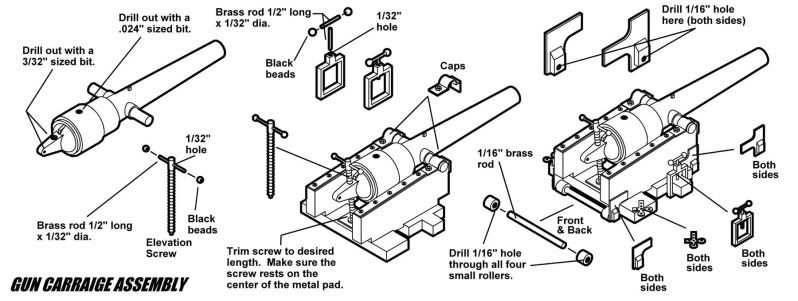
I love the business of producing and designing American Civil War model kits, but I HATE doing instruction sheets. For me, since I don't work in 3D that much, the process is tedious. The more complicated the kit, the more tedious it gets since every part must be drawn to scale in 3D. The fun part is tracing over the 3D working lines and producing the artwork you see below. Since every part is drawn in 3D, I literally assemble the kit in the computer before any molds are cast. It's great fun watching the model come to life on the screen. Still lots more drawing to do. This is the first step of the 7" Confederate Brooke Rifle kit that will be going into production soon. This represents about 4 days work.
Last edited by Rusty White on Fri Jan 20, 2012 10:15 pm, edited 1 time in total.
Rusty White
flagshipmodels.com
Home of the American Civil War warship kits
flagshipmodels.com
Home of the American Civil War warship kits
-
Tigerfish

- Posts: 100
- Joined: Thu Apr 10, 2008 5:41 am
Re: I HATE drawing 3D instruction sheets!
What software do you use?
-
Rusty White
- Flagship Models
- Posts: 280
- Joined: Fri Jan 14, 2005 11:02 pm
- Contact:
Re: I HATE drawing 3D instruction sheets!
DesignCad 3DMax V-20Tigerfish wrote:What software do you use?
It's an excellent, easy to use, and versatile program. I have been using it for some 15 years now. I'll post successive steps as I go.
Rusty White
flagshipmodels.com
Home of the American Civil War warship kits
flagshipmodels.com
Home of the American Civil War warship kits
-
Cadman

- Site Admin

- Posts: 3623
- Joined: Sat Jan 08, 2005 4:31 pm
- Location: Plattsburg, Missouri
Re: I HATE drawing 3D instruction sheets!
Rusty these look very nice. I don't know what you are complaining about. If more mfg's produced instructions like this, I would have nothing to complain about.
-
Rusty White
- Flagship Models
- Posts: 280
- Joined: Fri Jan 14, 2005 11:02 pm
- Contact:
Re: I HATE drawing 3D instruction sheets!
The tedium! While I am pleased with the finished product, it's like drawing manhole elevations and topo maps. Sorry all you Civil Engineers out there!Cadman wrote:Rusty these look very nice. I don't know what you are complaining about. If more mfg's produced instructions like this, I would have nothing to complain about.

Rusty White
flagshipmodels.com
Home of the American Civil War warship kits
flagshipmodels.com
Home of the American Civil War warship kits
-
Tigerfish
- Posts: 100
- Joined: Thu Apr 10, 2008 5:41 am
Re: I HATE drawing 3D instruction sheets!
The drawings look great!Rusty White wrote:DesignCad 3DMax V-20Tigerfish wrote:What software do you use?
It's an excellent, easy to use, and versatile program. I have been using it for some 15 years now. I'll post successive steps as I go.
-
Rusty White
- Flagship Models
- Posts: 280
- Joined: Fri Jan 14, 2005 11:02 pm
- Contact:
Re: I HATE drawing 3D instruction sheets!
Thanks so much for the kind words. Proceeding with the lower carriage chassis. At least this was a fairly easy draw. The next step won't be.

Rusty White
flagshipmodels.com
Home of the American Civil War warship kits
flagshipmodels.com
Home of the American Civil War warship kits
-
DrPR

- Posts: 1689
- Joined: Sun Mar 07, 2010 12:01 am
- Location: Corvallis, Oregon, USA
- Contact:
Re: I HATE drawing 3D instruction sheets!
Rusty,
I know what you mean. I have produced similar exploded parts diagrams for our company's products and it is tedious.
Have you tried Dempsey's "pushapart.d3m" macro for DesignCAD?
http://forum.designcadcommunity.com/ind ... pic=1582.0
It works pretty good for the first step of exploding an assembly.
You must be saving the 3D view as a 2D file and then using the 2D file as the basis for the instruction drawings - right?
Phil
I know what you mean. I have produced similar exploded parts diagrams for our company's products and it is tedious.
Have you tried Dempsey's "pushapart.d3m" macro for DesignCAD?
http://forum.designcadcommunity.com/ind ... pic=1582.0
It works pretty good for the first step of exploding an assembly.
You must be saving the 3D view as a 2D file and then using the 2D file as the basis for the instruction drawings - right?
Phil
A collision at sea will ruin your entire day. Aristotle
-
Rusty White
- Flagship Models
- Posts: 280
- Joined: Fri Jan 14, 2005 11:02 pm
- Contact:
Re: I HATE drawing 3D instruction sheets!
Correct. It's just a matter of tracing over the needed lines in 2D then erasing everything else.DrPR wrote:Rusty,
I know what you mean. I have produced similar exploded parts diagrams for our company's products and it is tedious.
Have you tried Dempsey's "pushapart.d3m" macro for DesignCAD?
No. The last thing I want to do is learn another program. The only time I use 3D is when I am drawing instruction sheets, so it goes pretty slow at times.
http://forum.designcadcommunity.com/ind ... pic=1582.0
It works pretty good for the first step of exploding an assembly.
You must be saving the 3D view as a 2D file and then using the 2D file as the basis for the instruction drawings - right?
Phil
Rusty White
flagshipmodels.com
Home of the American Civil War warship kits
flagshipmodels.com
Home of the American Civil War warship kits
-
Guest
Re: I HATE drawing 3D instruction sheets!
There is always freestyle. You'd have to investigate how to get the stuff out of Max, but it would save you a bit of work.
Example:
http://freestyle.sourceforge.net/GALLER ... rindex.php
Example:
http://freestyle.sourceforge.net/GALLER ... rindex.php
-
Cadman
- Site Admin
- Posts: 3623
- Joined: Sat Jan 08, 2005 4:31 pm
- Location: Plattsburg, Missouri
Re: I HATE drawing 3D instruction sheets!
Rusty, AutoCAD has a function called project that projects the 3D view into 2D. Surely your CAD program does something similar. As an alternate you can screen capture the 3D hidden views and then edit away in your favorite graphic program. Of course what your doing obviously works for you. Sometimes it's just best to do what you are comfortable with and then maybe when things slow down, try other things.
-
Rusty White
- Flagship Models
- Posts: 280
- Joined: Fri Jan 14, 2005 11:02 pm
- Contact:
Re: I HATE drawing 3D instruction sheets!
I was aware the AC has that function. Unfortunately Design Cad 3D Max v-20 does not. Exploding or projecting the drawings isn't the tedious part. Just creating everything in 3D is, due to my inexperience with it. The more I work with it, the more comfortable I am with 3D. Someone could make some serious money if they would create a dedicated 3D instruction program. Anyway, Auto-Cad and DC both create excellent looking instructions sheets. Just like any CAD program, it depends how adept one is creating the works.Cadman wrote:Rusty, AutoCAD has a function called project that projects the 3D view into 2D. Surely your CAD program does something similar. As an alternate you can screen capture the 3D hidden views and then edit away in your favorite graphic program. Of course what your doing obviously works for you. Sometimes it's just best to do what you are comfortable with and then maybe when things slow down, try other things.
I got 6 more ordinance kits in line to do instructions for!

Last edited by Rusty White on Sat Jul 30, 2011 1:12 am, edited 1 time in total.
Rusty White
flagshipmodels.com
Home of the American Civil War warship kits
flagshipmodels.com
Home of the American Civil War warship kits
-
DrPR
- Posts: 1689
- Joined: Sun Mar 07, 2010 12:01 am
- Location: Corvallis, Oregon, USA
- Contact:
Re: I HATE drawing 3D instruction sheets!
Rusty,
DesignCAD does have a 3D projection into 2D function - for at least 15 years now. I have attached an example.
Create the desired projection in the "main" window of the 3D drawing, with perspective if desired (change the view distance to control the amount of perspective). Then use "File/Save As" and select the "Save 2D Projection" option. Select the "With Hidden Line Removal" and "Enable Hidden Line Cleanup" options to get a pretty nice 2D file that you can edit.
Note: I still use the 2D projection as a template and trace over it on another layer in order to pick the lines I want and discard the others. The program just isn't any good at reading my mind and generating only the lines I want!
If you have questions about how to do something in DesignCAD ask on the User Forum - it is one of the best.
http://forum.designcadcommunity.com/index.php
Phil
DesignCAD does have a 3D projection into 2D function - for at least 15 years now. I have attached an example.
Create the desired projection in the "main" window of the 3D drawing, with perspective if desired (change the view distance to control the amount of perspective). Then use "File/Save As" and select the "Save 2D Projection" option. Select the "With Hidden Line Removal" and "Enable Hidden Line Cleanup" options to get a pretty nice 2D file that you can edit.
Note: I still use the 2D projection as a template and trace over it on another layer in order to pick the lines I want and discard the others. The program just isn't any good at reading my mind and generating only the lines I want!
If you have questions about how to do something in DesignCAD ask on the User Forum - it is one of the best.
http://forum.designcadcommunity.com/index.php
Phil
- Attachments
-
- 2D projection from 3D
A collision at sea will ruin your entire day. Aristotle
-
Rusty White
- Flagship Models
- Posts: 280
- Joined: Fri Jan 14, 2005 11:02 pm
- Contact:
Re: I HATE drawing 3D instruction sheets!
I understand that and I use that function often. I guess I was referring to a function that will separate portions of a drawing into an exploded view such as an instruction sheet. Auto-Cad refers to that function as "project" that we were referring to.
Rusty White
flagshipmodels.com
Home of the American Civil War warship kits
flagshipmodels.com
Home of the American Civil War warship kits
-
Cadman
- Site Admin
- Posts: 3623
- Joined: Sat Jan 08, 2005 4:31 pm
- Location: Plattsburg, Missouri
Re: I HATE drawing 3D instruction sheets!
Rusty, you should really consider beginning some of your project in CAD. You can RP them to create the masters. All with the benefit of test fitting on screen and getting the instructions would be the big bonus.
-
Rusty White
- Flagship Models
- Posts: 280
- Joined: Fri Jan 14, 2005 11:02 pm
- Contact:
Re: I HATE drawing 3D instruction sheets!
Unfortunately, I just don't have enough sales to justify stereo lithography. The cost (unless you know someone with the equipment) is very expensive right now. Hopefully the cost will come down in the future, because I would certainly like to design and test fit everything on screen before producing parts.
Rusty White
flagshipmodels.com
Home of the American Civil War warship kits
flagshipmodels.com
Home of the American Civil War warship kits
-
tea monster

- Posts: 275
- Joined: Sat Jun 11, 2011 5:02 pm
- Contact:
Re: I HATE drawing 3D instruction sheets!
I know that Autocad had a function to output parts from a CAD drawing. A friend of mine put together a full-size TARDIS console. He designed it in AutoCad and it printed out patterns to cut the wood to. So if AutoCad had that 10 years ago, then I'm sure that what you are using probably has something similar now. If you don't want to go the whole CAM route, then you could start off small with designing the kits in CAD and printing your part patterns out. Then you could work your way up as time and finances provide.
As Dr. PR said, drop a "This is what I'm doing, what is the best way of achieving it?" thread onto their forum.
As Dr. PR said, drop a "This is what I'm doing, what is the best way of achieving it?" thread onto their forum.
-
Rusty White
- Flagship Models
- Posts: 280
- Joined: Fri Jan 14, 2005 11:02 pm
- Contact:
Re: I HATE drawing 3D instruction sheets!
As Dr. PR said, drop a "This is what I'm doing, what is the best way of achieving it?" thread onto their forum.
As the good DR knows, I have done that when I run into something I just can't get to work. The DC forum is a very good place to ask questions.
As the good DR knows, I have done that when I run into something I just can't get to work. The DC forum is a very good place to ask questions.
Rusty White
flagshipmodels.com
Home of the American Civil War warship kits
flagshipmodels.com
Home of the American Civil War warship kits
-
DrPR
- Posts: 1689
- Joined: Sun Mar 07, 2010 12:01 am
- Location: Corvallis, Oregon, USA
- Contact:
Re: I HATE drawing 3D instruction sheets!
Rusty,
I understand now.
Dempsey has posted a "pushapart" macro for DesignCAD that explodes an assembly to create illustrated parts drawings, but it is just a first step. It moves all the parts away from each other but doesn't keep screws aligned with holes, etc.
Some people use the Paperspace mode to arrange multiple views.
But my experience has been that programs can't read your mind, so they can't automatically create your drawings for you.
Phil
I understand now.
Dempsey has posted a "pushapart" macro for DesignCAD that explodes an assembly to create illustrated parts drawings, but it is just a first step. It moves all the parts away from each other but doesn't keep screws aligned with holes, etc.
Some people use the Paperspace mode to arrange multiple views.
But my experience has been that programs can't read your mind, so they can't automatically create your drawings for you.
Phil
A collision at sea will ruin your entire day. Aristotle
-
Rusty White
- Flagship Models
- Posts: 280
- Joined: Fri Jan 14, 2005 11:02 pm
- Contact:
Re: I HATE drawing 3D instruction sheets!
That's right. Creating an exploded view of a drawing isn't that big a deal for me. Creating the drawing in 3D is the real time consumer. In any business time is money and as of now I have about 40 hrs (+ or -) in this instruction sheet for the Brooke Rifle. I'm almost done!
Rusty White
flagshipmodels.com
Home of the American Civil War warship kits
flagshipmodels.com
Home of the American Civil War warship kits