The chickasaw looks amazing.
One thing I would suggest for the Perry is that the stand looks a little one-dimension. I was wondering if you had enabled AO on your renders.
I'm going through the same thing with the Tecumseh as far as realistic wakes and smoke is concerned.
Blender has a smoke sim, and you could, theoretically rig up some particles and get some pretty good effects. There is also something called Dynamic Paint that allows you to create ship wakes. Again, more googling required as I've never used it.
What I was going to try was to chuck the whole scene into Zbrush and sculpt up a water plain. Not sure just how successfull that will be, but it's worth a try.
Owen
The CAD-yard
Moderator: ArizonaBB39
-
tea monster

- Posts: 275
- Joined: Sat Jun 11, 2011 5:02 pm
- Contact:
-
Roscoe
- Posts: 296
- Joined: Thu Jul 07, 2011 5:12 pm
Re: The CAD-yard
Thanks guys.
Yeah, don't recall if AO is enabled or not, shows you how much I know about the settings. I did use a bump and normal map on the stand, but I like I said, don't know enough about how all the settings work yet to get a decent look, I'll have to play with them some more.
I used Gimp to add the smoke to the Chickasaw pic because that was rendered in Solidworks, and just smudged the background and black paint I used into each other until it looked halfway decent. I can see it's going to take some time to get a good feel for doing that kind of stuff.
I do want to learn more about both the smoke sim, and Dynamic paint, but there's just so much to take in with Blender, it's easy to get overwhelmed.
Throw up a couple pics when you can, so we can check it out.
Cheers,
Dean
Yeah, don't recall if AO is enabled or not, shows you how much I know about the settings.
I did use a bump and normal map on the stand, but I like I said, don't know enough about how all the settings work yet to get a decent look, I'll have to play with them some more. I used Gimp to add the smoke to the Chickasaw pic because that was rendered in Solidworks, and just smudged the background and black paint I used into each other until it looked halfway decent. I can see it's going to take some time to get a good feel for doing that kind of stuff.
I do want to learn more about both the smoke sim, and Dynamic paint, but there's just so much to take in with Blender, it's easy to get overwhelmed.
Throw up a couple pics when you can, so we can check it out.
Cheers,
Dean
-
tea monster
- Posts: 275
- Joined: Sat Jun 11, 2011 5:02 pm
- Contact:
Re: The CAD-yard
Here's what I have so far in Octane. I've got the ocean nearly done. Still having some problems acurately translating the Ocean Sim over to octane, but generally it's going well.
Now that I have a pipeline established, I can return to work on the crew and start branching out into some other models.
Owen
Now that I have a pipeline established, I can return to work on the crew and start branching out into some other models.
-
Roscoe
- Posts: 296
- Joined: Thu Jul 07, 2011 5:12 pm
Re: The CAD-yard
Sweet! I'm digging that sunset scene.
I checked and AO wasn't on for that last Perry render, but I've been playing around with the texture settings, and getting better results. Not quite there yet, but starting to get the hang of it.
-Dean
I checked and AO wasn't on for that last Perry render, but I've been playing around with the texture settings, and getting better results. Not quite there yet, but starting to get the hang of it.
-Dean
-
tea monster
- Posts: 275
- Joined: Sat Jun 11, 2011 5:02 pm
- Contact:
Re: The CAD-yard
You can do smoke with planes and transparency. There is an example here.
There is a smoke sim in Blender, but 1. It doesn't work yet with Cycles and 2. Its a pain to set up and get working. Its possible to render your smoke in the old renderer and comp it together (Blender has a built-in compositor).
You should start learning Cycles. It's had a few speed-ups recently and it's getting to be able to kick out some quite tasty stuff.
A good, cheap way of getting decent lighting is to use an HDRI image. I tend to use a plane as a background, then slap on a nice studio HDRI image to get a classy result.
There is a smoke sim in Blender, but 1. It doesn't work yet with Cycles and 2. Its a pain to set up and get working. Its possible to render your smoke in the old renderer and comp it together (Blender has a built-in compositor).
You should start learning Cycles. It's had a few speed-ups recently and it's getting to be able to kick out some quite tasty stuff.
-
Roscoe
- Posts: 296
- Joined: Thu Jul 07, 2011 5:12 pm
Re: The CAD-yard
Thanks for the tips Owen.
Yeah, I definitely need to do some more experimenting with Blender. But for right now, I'm taking a few days to relax my brain after just getting back from a weeks worth of CAMWorks program training. All I can say is, my brain hurts.
-Dean
Yeah, I definitely need to do some more experimenting with Blender. But for right now, I'm taking a few days to relax my brain after just getting back from a weeks worth of CAMWorks program training. All I can say is, my brain hurts.
-Dean
-
tea monster
- Posts: 275
- Joined: Sat Jun 11, 2011 5:02 pm
- Contact:
Re: The CAD-yard
This isn't a major update or anything. I've just been larking around with Tekkit, which is a branch of Minecraft. This isn't supposed to be a proper reconstruction of any particular vessel. The back is kind of the Olympia, the front is sort of the CSS Stonewall. In between, it kind of morphed into something roughly WWII vintage. OK, that IS kind of weird, but I thought I'd share with you in case anyone was interested.
Here she is at her moorings next to my workshop.


Pest control in Minecraft can get a bit out of hand. The old sea dogs had to deal with pirates, pestilence, shipwrecks, rats and scurvy, but I bet they never bumped into a 4 foot long spider on the way to the hold!
In reality, none of the interior has been fitted out yet. The decks are in and the funnel, but I've got to put engines and cabins in.
Repel boarders!

The texture pack I'm using is Sphax Pure BD Craft 64
Owen
Here she is at her moorings next to my workshop.
Pest control in Minecraft can get a bit out of hand. The old sea dogs had to deal with pirates, pestilence, shipwrecks, rats and scurvy, but I bet they never bumped into a 4 foot long spider on the way to the hold!
In reality, none of the interior has been fitted out yet. The decks are in and the funnel, but I've got to put engines and cabins in.
Repel boarders!
The texture pack I'm using is Sphax Pure BD Craft 64
Owen
-
Roscoe
- Posts: 296
- Joined: Thu Jul 07, 2011 5:12 pm
Re: The CAD-yard
Now that is just too cool! I like it!
Got to ask though, how did the giant spiders get on your ship?
-Dean
Got to ask though, how did the giant spiders get on your ship?
-Dean
-
tea monster
- Posts: 275
- Joined: Sat Jun 11, 2011 5:02 pm
- Contact:
Re: The CAD-yard
Cheers!
The spiders (and creepers, zombies and skeleton warriors) spawn at night where it's dark. They either spawned on deck and fell down the companionways or I don't have my light level high enough on board. I do love Tekkit, it's like having a huge lego set that you can walk around in.
Now only if we could get the ships to actually move...
Owen
The spiders (and creepers, zombies and skeleton warriors) spawn at night where it's dark. They either spawned on deck and fell down the companionways or I don't have my light level high enough on board. I do love Tekkit, it's like having a huge lego set that you can walk around in.
Now only if we could get the ships to actually move...
Owen
-
Roscoe
- Posts: 296
- Joined: Thu Jul 07, 2011 5:12 pm
Re: The CAD-yard
Yeah, that would be nice.tea monster wrote: Now only if we could get the ships to actually move...
Owen
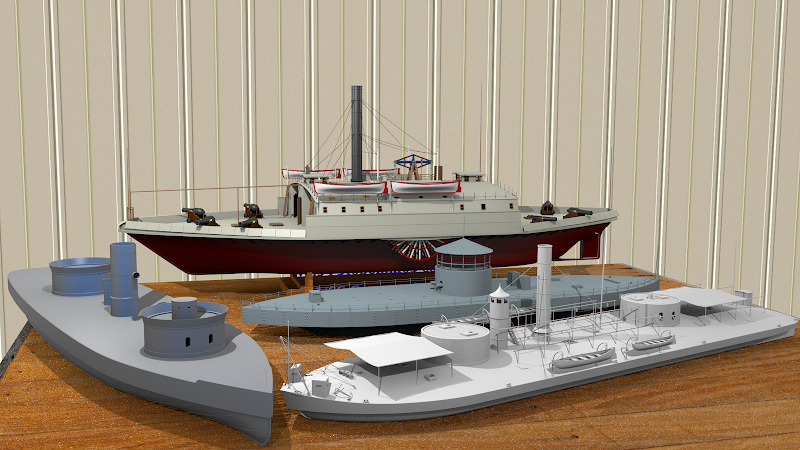
I've been playing around with the idea of making a display room in Blender to, you guessed it, display some of my virtual models in. And since I only have one ship model I've made in Blender, I imported a few others from SolidWorks to get started. Now, it's still early on with this project, and because SW models import as messy triangulated surfaces and not quad's, means I really can't texture them out well without redoing them. So for now, I'll leave those as simple, one color display models, until I get around to make more with Blender. So far, there's only one table, and one wall that's somewhat done, more to come.

-Dean
-
Fritz

- Posts: 125
- Joined: Fri Aug 04, 2006 12:03 pm
- Location: Salem, MA, USA
Re: The CAD-yard
Looks nice. Should make some virtual tools for the desktop and make a 'virtual workbench" That ought to mess with the analog builders heads. 
On a side note, what about exporting the files in .iges then importing those into blender? Surfaces should import as flow lines rather than meshes that way. (note, i'm just guessing as I've never worked with blender, but an .iges file is an .iges file)
On a side note, what about exporting the files in .iges then importing those into blender? Surfaces should import as flow lines rather than meshes that way. (note, i'm just guessing as I've never worked with blender, but an .iges file is an .iges file)
Best Regards
Fritz K.
Fritz K.
-
Roscoe
- Posts: 296
- Joined: Thu Jul 07, 2011 5:12 pm
Re: The CAD-yard
Fritz,
That's a great idea , a few Xacto knives, bottle of glue, a building mat, and some material scattered around a workbench sounds cool. Thanks for the idea.
Yeah, importing those models as IGES or DXF files might work better, I haven't tried it yet, but I have a feeling they would still need some re-surfacing work. I basically just imported them as STL files, which works well enough to get the overall shape of the model for scene rendering/placement practice. Although I'll still probably use a couple of those models to put on a workbench as WIP's, along with some tools, until my Blender fleet gets built up.
-Dean
That's a great idea
, a few Xacto knives, bottle of glue, a building mat, and some material scattered around a workbench sounds cool. Thanks for the idea.Yeah, importing those models as IGES or DXF files might work better, I haven't tried it yet, but I have a feeling they would still need some re-surfacing work. I basically just imported them as STL files, which works well enough to get the overall shape of the model for scene rendering/placement practice. Although I'll still probably use a couple of those models to put on a workbench as WIP's, along with some tools, until my Blender fleet gets built up.
-Dean
-
tea monster
- Posts: 275
- Joined: Sat Jun 11, 2011 5:02 pm
- Contact:
Re: The CAD-yard
What you need to do is to get some repeating textures of primer with some modelling putty poking through here and there where it's been sanded down.
Next, you need a copy of either 'Make Human' or 'Poser' to make yourself a digital alter ego.
Put them all together and enter one of the 'real' modelling threads. You could decide to have your digital creation's personality hate virtual modelling and set out to prove that any model he can make in 'real life' can be just as perfect as a CAD model. You could even have it that you get into a modelling competition with your creation.
This could be very entertaining for a certain amount of time, but if you wound up in therapy at the end of it all, don't blame me.
If you were feeling really subversive and cheeky, you could model him to have a faint resemblance to one of these guys...
Owen
Next, you need a copy of either 'Make Human' or 'Poser' to make yourself a digital alter ego.
Put them all together and enter one of the 'real' modelling threads. You could decide to have your digital creation's personality hate virtual modelling and set out to prove that any model he can make in 'real life' can be just as perfect as a CAD model. You could even have it that you get into a modelling competition with your creation.
This could be very entertaining for a certain amount of time, but if you wound up in therapy at the end of it all, don't blame me.
If you were feeling really subversive and cheeky, you could model him to have a faint resemblance to one of these guys...

Owen
-
DrPR

- Posts: 1689
- Joined: Sun Mar 07, 2010 12:01 am
- Location: Corvallis, Oregon, USA
- Contact:
Re: The CAD-yard
Dean,
You could develop this into a real mind bender. Draw the entire workshop, with a door to the outside world. When you go through that door step out onto the deck of one of the virtual models. Then you could look at the surrounding fleet with a 1:1 perspective, but they would still be sitting on a very large table, in the very large workshop. Go back in the door and you would see the fleet as you would looking at a table full of models.
You could create something Escher would have been proud of.
Phil
PS: We can think up all sorts of ways to waste your time.
You could develop this into a real mind bender. Draw the entire workshop, with a door to the outside world. When you go through that door step out onto the deck of one of the virtual models. Then you could look at the surrounding fleet with a 1:1 perspective, but they would still be sitting on a very large table, in the very large workshop. Go back in the door and you would see the fleet as you would looking at a table full of models.
You could create something Escher would have been proud of.
Phil
PS: We can think up all sorts of ways to waste your time.
A collision at sea will ruin your entire day. Aristotle
-
tea monster
- Posts: 275
- Joined: Sat Jun 11, 2011 5:02 pm
- Contact:
Re: The CAD-yard
Yes, you would make it so that the door in the work shop matched one of the hatches on the ironclad.
But one day, you would notice an exact copy of that door in your garage. While you were pondering on how long it had been there, the hatch clicks and slowly starts to open...
Owen
But one day, you would notice an exact copy of that door in your garage. While you were pondering on how long it had been there, the hatch clicks and slowly starts to open...
Owen
-
Roscoe
- Posts: 296
- Joined: Thu Jul 07, 2011 5:12 pm
Re: The CAD-yard
Lol, you guys are just too much... Although, that door or hatch to a bigger display table idea does sound really cool, hmm.
Owen,
I wonder if I could use that dynamic paint feature in Blender to simulate some putty patches on the models? Have any experience with that?
Phil,
That Escher like idea would definitely make a great scene, or even better, a short movie clip. When I get the regular size display room done, I just might have to give that a try....
-Dean
Owen,
I wonder if I could use that dynamic paint feature in Blender to simulate some putty patches on the models? Have any experience with that?
Phil,
That Escher like idea would definitely make a great scene, or even better, a short movie clip. When I get the regular size display room done, I just might have to give that a try....
-Dean
-
tea monster
- Posts: 275
- Joined: Sat Jun 11, 2011 5:02 pm
- Contact:
Re: The CAD-yard
There is a dynamic paint tut here. I've not worked with it myself though.
http://www.miikahweb.com/en/articles/dy ... aint-guide
Owen
http://www.miikahweb.com/en/articles/dy ... aint-guide
Owen
-
Roscoe
- Posts: 296
- Joined: Thu Jul 07, 2011 5:12 pm
Re: The CAD-yard
Thanks for the link, I haven't seen that one yet, but I have watched a couple others, and it looks pretty cool. I guess I'll just have to try it out and see what happens.
-Dean
-Dean
-
Roscoe
- Posts: 296
- Joined: Thu Jul 07, 2011 5:12 pm
Re: The CAD-yard
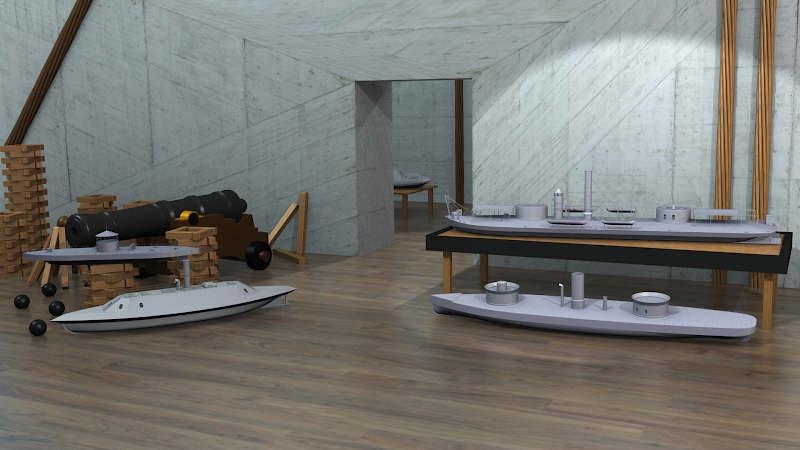
Continuing on with the display idea, I downloaded a nice Blender scene file by "JoJoJoy" from http://www.blendswap.com/, which I'll start modifying to make the display room. The nice thing about that site is there are hundreds of free open source files to download and use as you like, and all you have to do is register, which is free of course. A big time saver, if like me, you have more projects than time, or just want to get a feel for Blender and see how more experienced Blender heads do things.
So after tweaking the lighting, adding a few models, and hitting the render button, this is what I have so far, which will change as I add more of my own touches to the scene.
Take care,
Dean
So after tweaking the lighting, adding a few models, and hitting the render button, this is what I have so far, which will change as I add more of my own touches to the scene.
Take care,
Dean
-
Devin

- Posts: 2503
- Joined: Mon Jan 10, 2005 10:46 am
- Location: Hoboken, NJ
- Contact:
Re: The CAD-yard
Now THAT's cool!
I guess I hadn't looked at the LOA's close enough to realize that Chickasaw and Onondaga were so close in size.
I guess I hadn't looked at the LOA's close enough to realize that Chickasaw and Onondaga were so close in size.
We like our history sanitized and theme-parked and self-congratulatory, not bloody and angry and unflattering. - Jonathan Yardley