Tutorial: How to fair hull surfaces utilizing diagonals.

For discussion of Computer Modeling. Virtual Ship building. Computer Aided Design and Drafting, CAD/CAM, CGI, and the techniques behind them.

Moderator: ArizonaBB39

User avatar
Fritz
Posts: 125
Joined: Fri Aug 04, 2006 12:03 pm
Location: Salem, MA, USA

Tutorial: How to fair hull surfaces utilizing diagonals.

Post by Fritz »

Hello Gents

Jim Slade had asked me to demonstrate the process of fairing hull stations using diagonal splines. Instead of choking his inbox, I thought maybe I�d post as a tutorial here, in the event that others may be interested in this process as well. The intent of this tutorial is to display how the use of both diagonals and the concept of forshortened views, both techniques used for centuries in hand draughting, can be updated to CAD use to develop fair compound surfaces.

PART 1

For this tutorial, I�ll be starting with these old set of stations for a DLG. These were entered and generated from a table of offsets taken from the loft floor at the shipyard. (for anyone wishing to learn how to enter a table of offsets, let me know. I may consider doing another quick (meaning long winded) demo on how to generate a point cloud from them)

Keep in mind, you can click on the screenshots to see larger versions..
step1.jpg
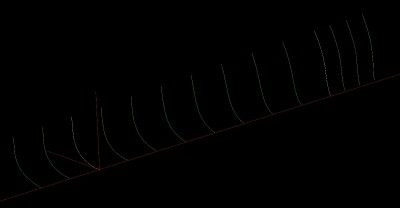
Doing an entire hull with one surface is near impossible with modern hulls, due to the amount of twist, and artificial features such as hollowed runs, skegs and bulbous bows. So, it is best to break the hull into sections. For the first section, I�m choosing to do from Station (Sta) 2 to Station 10 (midships). Note, I�m not starting at the extreme bow or stern itself. The reason being, that it allows me to have a couple of stations past each end, despite not being faired themselves, to help initiate the proper end conditions for the diagonal splines. To achieve this I have included Sta � to Sta12.
step2.jpg
This shows a view of my Stations from below the bow. While my screenshots don�t show color very well, the ends of the surface I intend to generate are bordered by the yellow stations. As I continue, I�ll be using the �cubic spline� functions to generate my splines. The issue with cubic splines, is that unless you have a way to define the end conditions, such as using a tangency, angle, or vector with magnitude, the splines tend to flatten out at the ends. Having the extra stations ahead and behind as I generate them, assures that the splines have fully developed curvature in the work area. The flattened ends will then be trimmed off before creating the surface.

First, just as an example however, I�m going to use the existing stations to create a surface to make a point. This is a surface generated, using the �Curve Mesh Surface� function in KeyCreator (your function may be called something different depending on program) I selected the stations in sequence as my primary curves, and used waterlines as my secondary curves.
step3.jpg
We can see from the splotchy highlights on the turn of the bilge, that things are pretty lumpy. The causes are two-fold. The first is that the stations themselves have errors, either by the offsets not being transcribed properly, or by not having been properly faired to begin with. Being off by an inch won�t show on a �� to the foot hand drawing, but will get magnified by a computer. Another cause, is by the waterlines themselves. They force panels on the aft bottom, and forward sheer to be overly large , this causes crushing, and ultimately warping, of the surface flow lines at the opposing ends.

And now, were going to correct both.

Going back to the fore-and-aft view, I�ve laid in where I intend to create my diagonals. I�ve drawn these lines on the fore-aft view, at the midships plane.
step4.jpg
Some notes on choosing how to place your diagonals: Looking at the screenshot, you will notice that they are not evenly spaced. As a general rule of thumb, you want your diagonals more closely spaced where the hull curvature is tighter. In this case, the turn of the bilge at midships is relatively even. Thus, I want my diagonals to intersect them at relatively even intervals along their length. At the forward stations, the upper flare is relatively slack, so the spacing increases. Down low where the curve is tighter, the spacing gets a little closer.

The second thing to consider, when choosing their placement and angle, is their normalcy to the shell plating. I.E. they want to be relatively perpendicular to the stations that they pass through. Notice that diagonals 2 and 3 in the above screen shot are almost perpendicular to all the stations they pass through. This is not always possible in all cases, however, so then the trick is to choose a diagonal that sort-of averages out, such as 1 and 5. In hind sight, I should have made the inboard ends of 6 and 7 a little higher to get a better average in this area, where there is a lot of twist. Luckily, there is a little room for error in this regard, and this surface should still work out OK as we will see.

The next step is to create points on the stations, at their respective depths, where they intersect these diagonals. In my case it�s done with �create point� -�intersection�-�at depth� and then selecting second if I selected the station second, or visa-versa. And I get something like this.
step5.jpg
This next view shows how it all looks from the lower bow.
step6.jpg
To be continued..
Last edited by Fritz on Thu Feb 21, 2013 1:41 am, edited 1 time in total.
Best Regards

Fritz K.
User avatar
Fritz
Posts: 125
Joined: Fri Aug 04, 2006 12:03 pm
Location: Salem, MA, USA

Re: Tutorial: How to fair hull surfaces utilizing diagonals.

Post by Fritz »

Part 2

These are the points I�ll be using to generate my preliminary diagonal splines. And so now, the easy part. Using the �cubic spline� function, I connect each row of points in succession. Like so�.
step7.jpg
Now, for the next ancient process called forshortened viewing. In times of yore (AKA my childhood) when these things were done on paper, there were no programs or algorithms to tell you if you curve was fair or not, or if it had any abnormal sudden changes in local curvature. The only way to determine this was to lay your drawing out on the board and then put your head down, temple to table, with the eye furthest away closed, and the eye closest to the table sighting down the length of the curve, This is called foreshortening. By this vantage point, any waviness sticks out like a sore thumb! In the olden days, you would do this, and then.. with your head still pressed to the droughting board, adjust your ducks, and spline, to redraw the curve.. pretty simple really.

However in the modern era: Yeah we could do this, and press our heads to the screen. But then, we look silly, and even sillier still as our hair stands on end from the static generated by our screens. (not so much with LCD screens, but you get the point). With the miracle of modern technology, We just rotate the view of our model a hair down and to the right, like thus�.
step8.jpg
Now every thing looks OK.. But let�s take a CLOSER look.
step9.jpg
So, I zoom in at the aft end of diagonal splines 1 and 2 and see this! Di. #1 looks OK, but there is a bump with Dia #2 at about Sta. 8. Which means Sta, 8 is off in this area. I�ve drawn an arrow to point it out. If you can see the colors, you will notice that I�ve already changed the color of this point from purple to yellow, just to remind me where the station needs to be corrected.

Now rotating the bow up a bit I can get a look at the aft end of the lower diagonals. Again here there are a few wobbles a shown by the arrows.
step10.jpg
After marking these points in yellow, I repeat the process with all the splines: Rotating the view as needed to get a good sightline down each section, and then marking the points in yellow, so I can pick them out in the next step.

Once done, I create news splines, but this time skipping all the yellow points. The next screen shot shows a close-up of the Sta.8 Dia 2 intersection that was shown earlier. The original diagonal is shown in purple, the new one shown in blue. The difference in a forshortened view looks huge, but the truth is the difference is just less than an inch, at full scale! But that�s the difference that will give a fair surface.
step11.jpg
Next I delete the old diagonal splines. In this particular example, it turns out that almost all of the offending points were on stations 8 and 5. so I�ve deleted them as
as well. Now we get a better view of the new splines and we can see that they look a lot smoother.
step12.jpg
To be continued..
Best Regards

Fritz K.
User avatar
Fritz
Posts: 125
Joined: Fri Aug 04, 2006 12:03 pm
Location: Salem, MA, USA

Re: Tutorial: How to fair hull surfaces utilizing diagonals.

Post by Fritz »

Part 3

In this next screenshot I�ve rotated back to the lower bow view. I�ve added the rabbet line (along the keel) and the sheer line (previously faired). I�ve also taken the liberty to trim the diagonal splines to the ends of our intended surface. In preparation of replacing Stations 8 and 5, I�ve created points where the faired diagonals intersect their respective depths.

Now in this case, it was only two stations that were poorly transcribed, but more often than not, things aren�t this pretty. Sometimes it�s the top of a station is out of whack, but the lower portion works out well, and over the course of 20 stations, a couple of them need to be totally redone, and a majority of the rest at least have to be partially redone. But with practice and experience you will get the hang of it.
step13.jpg
After connecting the new station points with cubic splines, I�ve cleaned up the remaining background clutter to show the final mesh we will use to generate the surface with.
step14.jpg
Now, once again, using �Curve Mesh Surface� we make the final fair surface, selecting the stations front to aft as primary curves, and the diagonals from top to bottom as the secondarys.
step15.jpg
Looking at the highlights, The bumps have been removed, everything transitions smoothly, and uniformly.

Using these methods I�ve gone ahead and done the other hull surfaces. For each one, I�ve left the diagonal lines in purple, so you can see the development. For example the diagonal for the last surface towards the transom, the side diagonals start out almost horizontal, and as the bottom goes through the turn of the bilge, they almost go vertical.
step16.jpg
Back at the beginning I mentioned starting with a middle surface. The reason for this is that by doing this, I can use the ends of that surface to control the end conditions for the splines in the adjoining surface as I work forward or aft. For example: after making the mid forward surface, I then determine the diagonal positions for the adjoining aft surface. I create a plane at that aft surface diagonal, use it to create �spline� �planar slice� �surface� . As I create my diagonal splines for the aft middle surface, I can use these sliced splines of the forward surface to set the end condition for the new aft splines, by setting the end condition at �tangent� with a vector magnitude of 1.0.. This will ensure that the ends of the surfaces are tangent to each other, and prevent any bumps occurring where the surfaces join.

And so finally just to show where this all goes, I made my separate surfaces with these meshes, trimmed them up, mirrored them, and used the �stitch function to join them all into one solid hull
step17.jpg
As I mentioned earlier, all these functions are for KeyCreator, however most 3D solid programs have similar functions buried in their menus somewhere. It may take a little investigating to find what your functions are actually named, but once you find them, you should be all set.

Hope this inspire a few to try modeling a complex, compound hull. While it can be tedious, as it can be a bit of trial and error to find which points to choose that will give a fair curve, but it�s not rocket science, and it can be done. And the more you try, the easier it will be to get the feel for which points, an diagonal angles should be chosen.

HTH
Last edited by Fritz on Fri Feb 22, 2013 3:01 pm, edited 1 time in total.
Best Regards

Fritz K.
mcg
Posts: 201
Joined: Thu Apr 28, 2005 8:46 pm

Re: Tutorial: How to fair hull surfaces utilizing diagonals.

Post by mcg »

Fritz, thank you so much for posting this. I have on this computer drawings and a rough draft hull for the original SMS Emden. Rough draft is the best I can say for it. I have never been able to successfully fair the thing in CAD. I bet this is the way to do it. Thanks! Michael
User avatar
DrPR
Posts: 1689
Joined: Sun Mar 07, 2010 12:01 am
Location: Corvallis, Oregon, USA
Contact:

Re: Tutorial: How to fair hull surfaces utilizing diagonals.

Post by DrPR »

Fritz,

I use a different program (DesignCAD), with different functions, but I do the same process of looking down the length of the hull for bumps and pits. In my case it is very easy to stretch a surface over the station or frame lines. I use a "Contour" tool to generate a contour map of the hull. Then I delete the surface and examine the contour lines for irregularities. I find the offending points and either delete them from the station lines or reposition the points. I repeat this process until all the contour lines are smooth curves. When the contour lines look good I examine the rendered surface for irregular reflections.

It is a bit tedious, but it doesn't take too long and it produces a near perfect hull.

Phil
A collision at sea will ruin your entire day. Aristotle
User avatar
Fritz
Posts: 125
Joined: Fri Aug 04, 2006 12:03 pm
Location: Salem, MA, USA

Re: Tutorial: How to fair hull surfaces utilizing diagonals.

Post by Fritz »

Thanks Phil

As I said, commands may be different depending on what 3D package a person uses. So if yourself, and others know what those commands, functions or shortcuts are, please add them to the thread. Hopefully we'll help out a few neophytes. Or in the event that we ourselves have to switch to a different program, we'll know what to expect, and not get too lost.
Best Regards

Fritz K.
User avatar
DrPR
Posts: 1689
Joined: Sun Mar 07, 2010 12:01 am
Location: Corvallis, Oregon, USA
Contact:

Re: Tutorial: How to fair hull surfaces utilizing diagonals.

Post by DrPR »

Fritz,

The key is just what you describe - drawing lines on the hull surface (hull sight lines) and viewing them end on. The slightest irregularity on the surface will stand out as a wavy line.

I create the initial station lines from the Table of Offsets. This is much more accurate than trying to trace drawings of hull lines. The Tables of Offsets list the distance from the ship center line at various places (stations or frames) along the length of the ship and various heights (waterlines). For US ships the values are given in three numbers for feet, inches, and eighths of an inch. So 23-4-5 is 23 feet, 4 5/8 inches. Occasionally a number will be followed by a plus (+) like 14-8-3+. This means it is a little more than 14 feet 8 3/8 inch but less than 14 feet 8 1/2 inch. I normally convert these numbers to sixteenths of an inch, which makes this 14 feet 8 7/16 inch.

I enter the original numbers into a spread sheet, with columns for feet, inches and eighths. Then I create another table where all three numbers are combined and converted to decimal inches. So 14-8-3+ becomes 14*12 + 8 + 0.4375 = 176.4375. I use inches for the base unit of the drawing for these older US designs and work with an accuracy of at least four decimal places. This is overkill, because there is no way a shipyard could build with that accuracy!

If you are especially lucky you will also have a Table of Hull Sight Lines. These are lines at the boundary between strakes of the hull plating. These tables tell where the edges of the hull plates were located. They are much more accurate at the bow and stern than the Table of Offsets data. And if you want to model the hull plating you can do it very accurately. The numbers work just like the Table of Offsets except that they are not at constant waterline elevations.

Occasionally I find errors in the tables. It is almost always an error of 1 foot, 1 inch or 1/8 inch. When the draftsman should have written 12-4-9 he accidentally enters something like 13-4-9, 12-3-9 or 12-4-8. Using the technique you described it is very easy to spot even the 1/8 inch error.

****

One thing I have learned about working with irregular or compound surfaces is that each surface can serve as a template for another generation of the surface. I use the original station line curves as templates for stretching a surface. Then I correct the curves and generate another surface, and so on.

Occasionally I need intermediate curves to get better control of the surface. For this I just use the grid pattern of a surface as a template and draw a new intermediate curve. DesignCAD has a "gravity snap" feature that makes it extremely easy to set points of a new curve by just right clicking with the cursor close to a surface grid intersection. With a few snaps I have a new intermediate curve. Then I create a new surface using the new line. This way I can create as many intermediate curves as I want between the original station/frame lines. I can tweak them as needed to force the surface to curve smoothly, especially in areas where sharp transitions may cause waves or wrinkles in the surface.

****

As you said, creating new hull sight lines on a surface is the key to getting it smooth.

DesignCAD has several ways to create the contour lines on the hull surface, but I find the "Contour" function to be the easiest and most reliable method. It was originally intended to create topographic map contour lines from grid surfaces that were generated from random survey data points. But the program doesn't know the difference between a hill and a hull, so it works perfectly to generate hull sight lines. I put these on a separate layer so I can disable other layers to make it easier to view the lines.

Other programs have ways to slice surfaces, generate contour lines, or find the intersection between planes and a surface. All can be used to generate the sight lines.

Phil
A collision at sea will ruin your entire day. Aristotle
Roscoe
Posts: 296
Joined: Thu Jul 07, 2011 5:12 pm

Re: Tutorial: How to fair hull surfaces utilizing diagonals.

Post by Roscoe »

Nice tutorial Fritz, thanks for sharing! It's always cool to see how others go about making their ships, big or small.

Take care,
Dean
Post Reply

Return to “Virtual Ship Modeling”